GPT Workspace vs Microsoft Copilot: Which AI Is Better for Google Users in 2026?
A detailed comparison of GPT Workspace and Microsoft Copilot — pricing, features, integrations, and real-world performance. Find out which AI assistant is the best fit for Google Workspace users.

If you spend your workday in Google Docs, Gmail, and Sheets, and you’re weighing your AI assistant options, the comparison that keeps coming up is GPT Workspace vs Microsoft Copilot. On the surface, both tools promise to speed up your writing, summarize documents, and automate repetitive tasks. But they were built for different ecosystems and make very different trade-offs.
This comparison is written specifically for Google Workspace users. If you’re already committed to Google’s suite — or evaluating whether it’s worth switching — this breakdown will save you the time of reading generic AI comparisons that don’t address your actual situation.
GPT Workspace vs Microsoft Copilot: Quick Verdict
Use GPT Workspace if you live in Google Docs, Gmail, Sheets, and Slides and want deep, native AI integration powered by GPT-4o or GPT-4.5 without leaving your existing tools.
Use Microsoft Copilot if your organization has already standardized on Microsoft 365 — Word, Excel, Outlook, Teams — and you want AI that’s natively built into those apps.
The honest answer: if you’re working in Google Workspace, Microsoft Copilot is a poor fit. It’s designed around Microsoft’s stack. Using it with Google tools requires workarounds, and the integration quality reflects that.
What Is GPT Workspace?
GPT Workspace is a Chrome extension and Google Workspace Add-on that integrates OpenAI’s models — GPT-4o, GPT-4.5, o1, and o3 — directly inside Google Docs, Sheets, Slides, Gmail, and Drive. It was built specifically to make ChatGPT-quality AI available without leaving Google’s interface.
The core experience is a sidebar that appears alongside your Google app. You select text, describe what you want, and the AI acts on it in context — rewriting a paragraph, analyzing spreadsheet data, drafting an email reply, building a slide deck outline. There’s no copy-pasting between tabs.
GPT Workspace also includes a library of pre-built prompts for common tasks, multi-model switching so you can choose the right AI for each job, and admin controls for team deployments. It integrates with Google Drive, meaning you can reference documents from your Drive in your prompts.
For a detailed setup walkthrough, see the full installation guide for GPT Workspace.
What Is Microsoft Copilot for Microsoft 365?
Microsoft Copilot is Microsoft’s AI assistant embedded across the Microsoft 365 suite — Word, Excel, PowerPoint, Outlook, Teams, and OneNote. Microsoft built Copilot using a combination of OpenAI’s GPT-4 models and their own Azure AI infrastructure, with tight integration into Microsoft Graph (which connects your emails, calendar, documents, and Teams messages).
Copilot’s primary strength is cross-application intelligence. It can pull context from your Outlook calendar, reference a Teams conversation, and draft a Word document that ties them together — because all of those apps share a common data layer in Microsoft 365.
For Microsoft 365 users, this is genuinely powerful. The AI understands your organizational context in a way that standalone ChatGPT cannot.
For Google Workspace users, almost none of this applies. Copilot doesn’t integrate with Google Docs, Gmail, or Sheets in any meaningful way. Microsoft Graph doesn’t connect to your Google data. The cross-app intelligence that makes Copilot compelling in Microsoft’s ecosystem simply doesn’t function outside of it.
Pricing Comparison
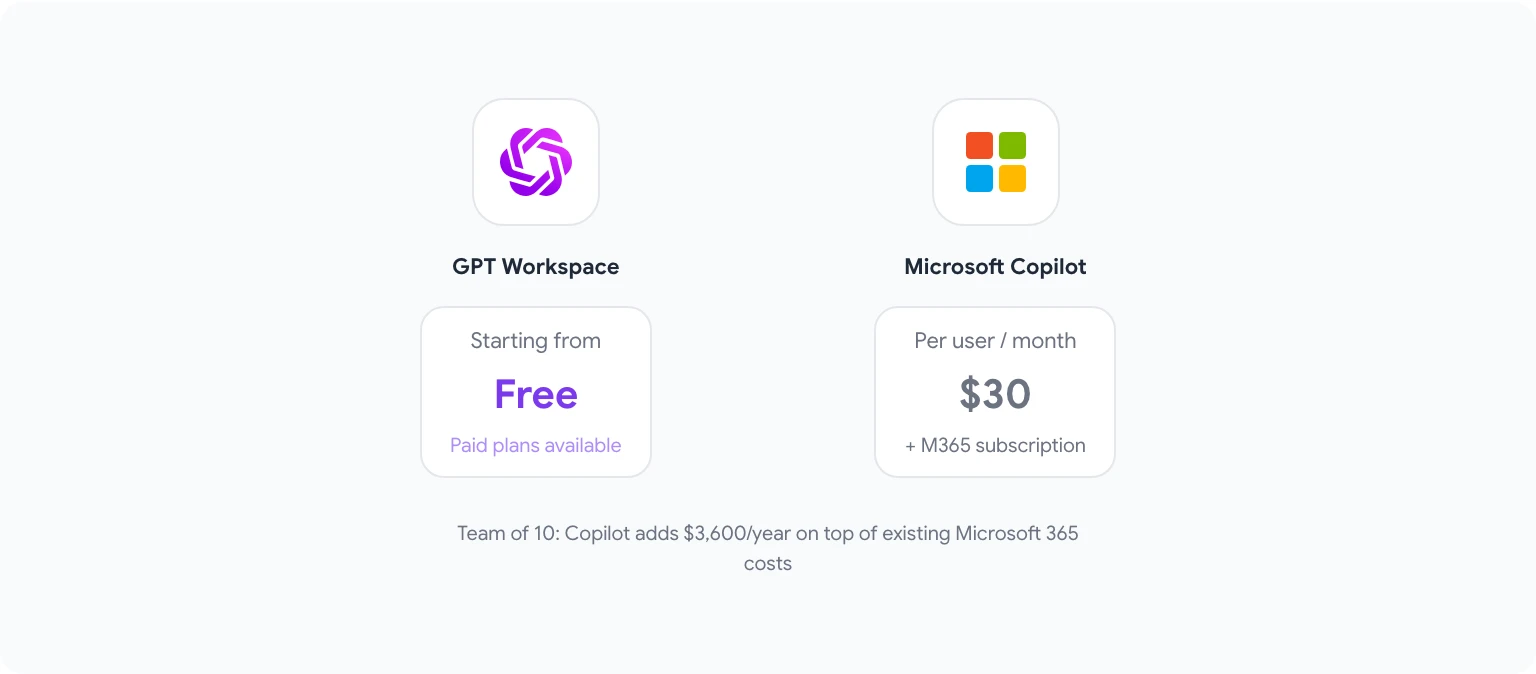
GPT Workspace offers a free tier with limited usage, and paid plans starting at accessible price points for individual users. Team and business plans include admin controls, usage analytics, and priority support. Current pricing is available at gpt.space/pricing.
Microsoft Copilot for Microsoft 365 is priced at $30 per user per month, added on top of an existing Microsoft 365 subscription (which itself starts at $6–$22 per user per month depending on the plan). There is no free tier for the full Copilot experience — Microsoft offers a limited “Copilot” feature in some base plans, but full Copilot capabilities require the paid add-on.
For a team of 10 people, Microsoft Copilot adds $3,600 per year just for the AI layer, before the underlying Microsoft 365 cost. If your team is already on Google Workspace, that means paying for a second productivity suite you don’t need just to access Copilot.
GPT Workspace is meaningfully more affordable for Google Workspace teams and doesn’t require switching your entire productivity stack.
Feature-by-Feature Comparison
| Feature | GPT Workspace | Microsoft Copilot |
|---|---|---|
| Google Docs integration | Native | None |
| Google Sheets integration | Native | None |
| Gmail integration | Native | None |
| Google Slides integration | Native | None |
| Word/Excel/PowerPoint integration | None | Native |
| Outlook integration | None | Native |
| Model choice (GPT-4o, o1, etc.) | Yes | Limited |
| Custom prompt library | Yes | Limited |
| Team admin controls | Yes | Yes |
| Cross-app context (email + docs) | Google ecosystem | Microsoft ecosystem |
| Drive/SharePoint integration | Google Drive | SharePoint |
| Free tier | Yes | No |
Integration Depth: Google vs Microsoft
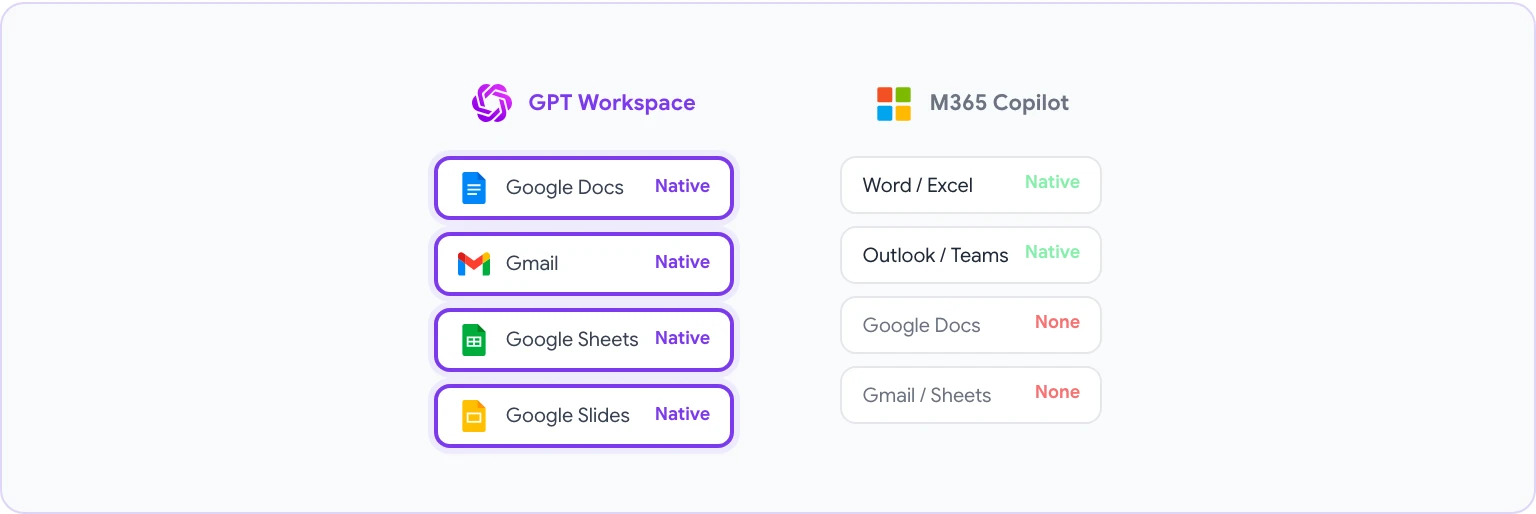
This is the central issue for this comparison. Integration depth — how deeply the AI is woven into the specific tools you use — determines 80% of the day-to-day value you get from an AI assistant.
GPT Workspace was built to integrate with Google’s suite. The sidebar appears automatically in Google Docs, Sheets, Slides, and Gmail. It can read your document content, access your Drive files, and write changes back directly. The integration feels native because it was designed specifically for these apps.
Microsoft Copilot was built to integrate with Microsoft’s suite. Its deep integrations are in Word, Excel, PowerPoint, Outlook, and Teams. When you use Copilot inside Word, it understands your document structure, can pull from your recent emails, and connects to SharePoint files. That level of integration only exists within Microsoft’s ecosystem.
Trying to use Microsoft Copilot in a Google Workspace environment means using a tool that was fundamentally designed for a different ecosystem. You get generic AI capabilities without the application-specific intelligence that makes Copilot compelling.
AI Model Quality
Both tools use OpenAI’s models at their core, but with different implementations.
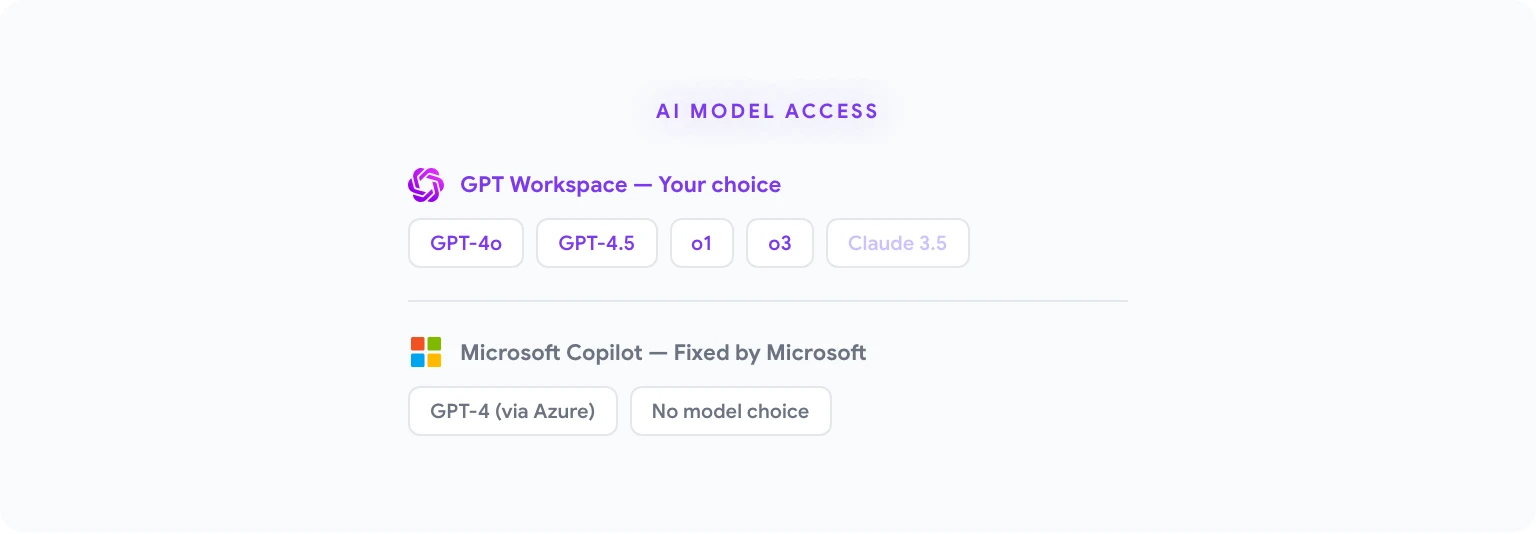
GPT Workspace gives you direct access to OpenAI’s latest models: GPT-4o, GPT-4.5, o1, and o3. You can switch between them depending on the task — using o3 for complex reasoning, GPT-4o for fast generation, or o1 for careful analytical work. This flexibility is a genuine advantage for power users who understand the trade-offs between models.
Microsoft Copilot uses GPT-4 as its foundation but routes everything through Azure’s infrastructure and Microsoft’s own orchestration layer. You don’t choose the model — Microsoft makes that decision, and the output is filtered through additional layers before reaching you. This can reduce latency and improve safety filtering, but it also means less direct control over model behavior.
For most tasks, the output quality difference is minimal. For complex technical work, having access to o1 or o3 through GPT Workspace can matter.
Writing and Content Creation
Writing assistance is where both tools perform well, and the gap between them narrows considerably.
GPT Workspace’s writing features inside Google Docs include drafting from prompts, rewriting selected text, adjusting tone and length, generating outlines, and summarizing long documents. The sidebar stays open as you work, so you can iterate quickly without losing context.
The guide to AI email writing prompts for Gmail covers some of the most practical writing use cases in depth.
Microsoft Copilot’s writing features inside Word are comparable: draft from description, rewrite, summarize, adjust tone. Copilot also has a “coaching” feature that gives feedback on drafts — suggesting improvements to clarity, tone, and length.
For pure writing quality, both tools are roughly equivalent. The deciding factor is which writing environment you’re in. Google Docs users will find GPT Workspace faster and more fluid. Word users will find Copilot equally seamless.
Spreadsheets and Data Analysis
This is where the comparison gets more interesting for data-heavy users.
GPT Workspace in Google Sheets lets you describe analysis tasks in plain English — “find the top 10 customers by revenue,” “calculate month-over-month growth,” “identify outliers in column C” — and it generates the formulas or runs the analysis directly. It can also help you build complex QUERY functions, debug formula errors, and generate charts based on your data.
Microsoft Copilot in Excel has similar capabilities but adds a dedicated “Copilot” button in the Excel ribbon that opens an analysis sidebar. Copilot in Excel can generate pivot tables, write Python code for data analysis (in Excel’s Python feature), and explain what a formula does.
For power Excel users, Copilot’s Python integration is genuinely impressive. For the majority of spreadsheet work — formulas, analysis, visualization — both tools perform comparably within their respective apps.
Email: Gmail AI vs Outlook AI
GPT Workspace in Gmail adds an AI sidebar to your inbox. You can draft replies with a description, adjust tone, summarize long email threads, and use pre-built prompts for common email types (follow-ups, meeting requests, feedback responses). It reads the email you’re replying to for context, so you don’t need to paste content into a separate prompt.
Microsoft Copilot in Outlook integrates similarly, with a focus on drafting and summarizing. Copilot in Outlook can also summarize entire threads, prepare you for meetings by compiling relevant emails, and draft follow-up emails that reference specific meeting content.
Both implementations work well within their respective apps. Copilot’s meeting preparation feature — pulling context from Teams and Calendar alongside Outlook — is unique to the Microsoft ecosystem. For Gmail users, this cross-app context doesn’t exist in the same way, but GPT Workspace’s drafting quality within Gmail itself is strong.
Who Should Choose GPT Workspace?
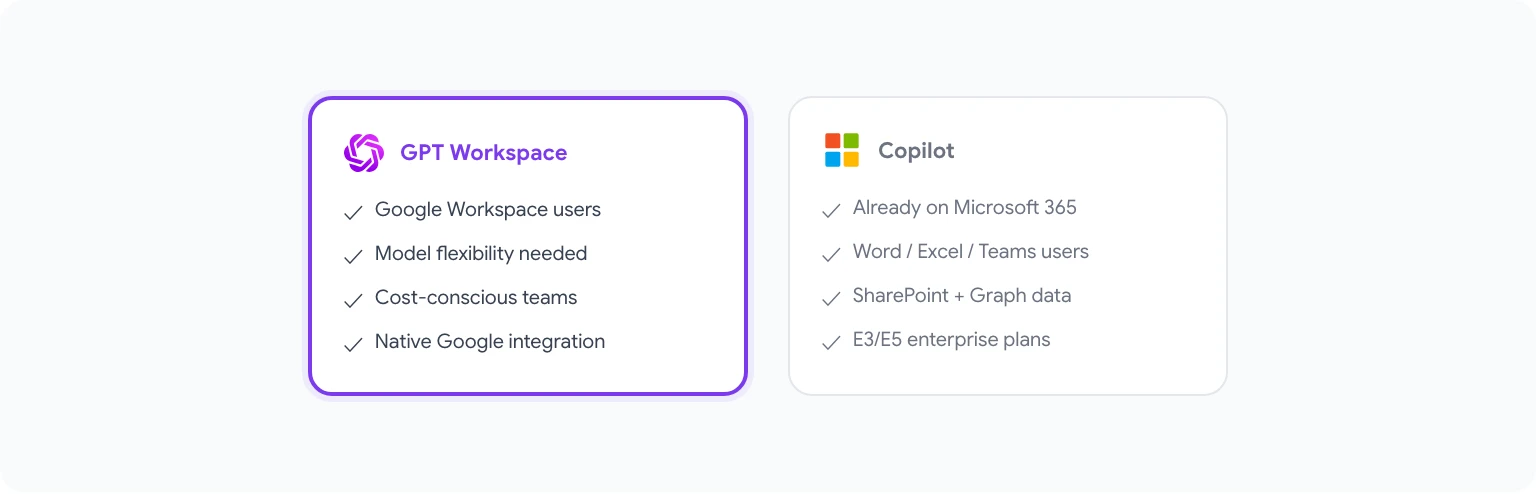
GPT Workspace is the right choice if:
- Your team uses Google Workspace (Docs, Sheets, Slides, Gmail, Drive)
- You want model flexibility — access to GPT-4o, o1, o3 for different tasks
- You need AI that works inside your existing apps without switching tools
- You want a more affordable AI layer without paying for a second productivity suite
- You need team deployment and admin controls within Google’s ecosystem
See the best AI tools for Google Workspace in 2026 for a broader look at how GPT Workspace fits alongside other tools.
Who Should Choose Copilot?
Microsoft Copilot is the right choice if:
- Your organization is already standardized on Microsoft 365
- You use Word, Excel, PowerPoint, Outlook, and Teams as your primary tools
- You need cross-app AI that spans your email, calendar, documents, and meetings within Microsoft’s ecosystem
- Your organization already pays for Microsoft 365 E3/E5 plans where Copilot licensing makes financial sense
Final Verdict
The comparison between GPT Workspace and Microsoft Copilot is less about which AI is “better” and more about which ecosystem you live in. These tools are designed for different stacks, and trying to use the wrong one creates friction rather than eliminating it.
For Google Workspace users, GPT Workspace is the clearer choice. It was built for your tools, integrates natively with the apps you already use, gives you access to the best available AI models, and does all of it at a fraction of Microsoft Copilot’s cost.
Microsoft Copilot is excellent — but it’s excellent for Microsoft 365 users. If you’re looking for the best AI for Google Workspace, you’re looking at GPT Workspace.
For a comparison of GPT Workspace against Google’s own native AI option, see GPT Workspace vs Gemini for Google Workspace.