GPT Workspace for Sales Teams: Close More Deals with AI in Google Workspace
How sales teams use GPT Workspace to write cold emails, create proposals in Docs, analyze CRM data in Sheets, and automate follow-up sequences — all without leaving Google Workspace.

Sales is a profession where the difference between average and top performance often comes down to volume and consistency — how many well-crafted outreach messages go out each week, how quickly proposals follow discovery calls, how thoroughly reps prepare for meetings with key accounts. AI tools for sales teams in Google Workspace don’t change what good selling looks like; they change how fast and consistently a rep can do it. Cold emails that used to take 20 minutes per prospect now take 3. Proposals that required a half day to compile are ready in an hour. Follow-up sequences that often got skipped are drafted automatically.
This guide covers the practical side of deploying GPT Workspace across a sales team: from writing personalized outbound at scale, to using AI-assisted formulas in Sheets to analyze pipeline data, to preparing for high-stakes account calls with AI research summaries.
How AI Is Changing B2B Sales Workflows
The B2B sales process has always been document-heavy: prospecting emails, qualification call notes, proposals, pricing documents, follow-up emails, negotiation summaries, customer success handoffs. A productive sales rep produces a substantial volume of written communication every single day, most of it only slightly varied from the day before.
That repetition is exactly where AI delivers the most leverage. When the variance between messages is small — swap the company name, reference a different pain point, adjust the offer — AI can handle the draft. The rep’s job shifts from writing to editing and judgment: is this the right message for this account? Does the tone match? Is the call to action strong enough?
The second shift is analytical. Sales reps who live in Sheets — tracking pipeline by stage, calculating commission, forecasting close rates — historically needed spreadsheet skill or a RevOps colleague on speed dial to build useful analyses. AI formula generation removes that dependency entirely.
The third shift is preparation. Before an important call, a rep typically spends 20–30 minutes reading through past emails, reviewing notes, and researching the account. AI can compress that research into a structured briefing in minutes.
Writing Personalized Cold Emails at Scale
Personalization is what separates a cold email that gets a reply from one that gets deleted. The challenge has always been that true personalization takes time — researching the prospect, referencing something specific, connecting it to a genuine pain point. At scale, that math breaks down.
GPT Workspace solves this by letting you personalize efficiently within a consistent structure:
- Open Gmail and click the GPT Workspace sidebar.
- Provide the prospect context in the prompt: company, role, a specific detail (recent funding, a job posting, a published piece they wrote, a common connection).
- Prompt: “Write a cold outreach email to [Name], [Title] at [Company]. They recently [specific event/detail]. We help [ICP description] do [outcome]. Reference the specific detail naturally — don’t force it. Subject line and email body, under 120 words total. Call to action: 15-minute call.”
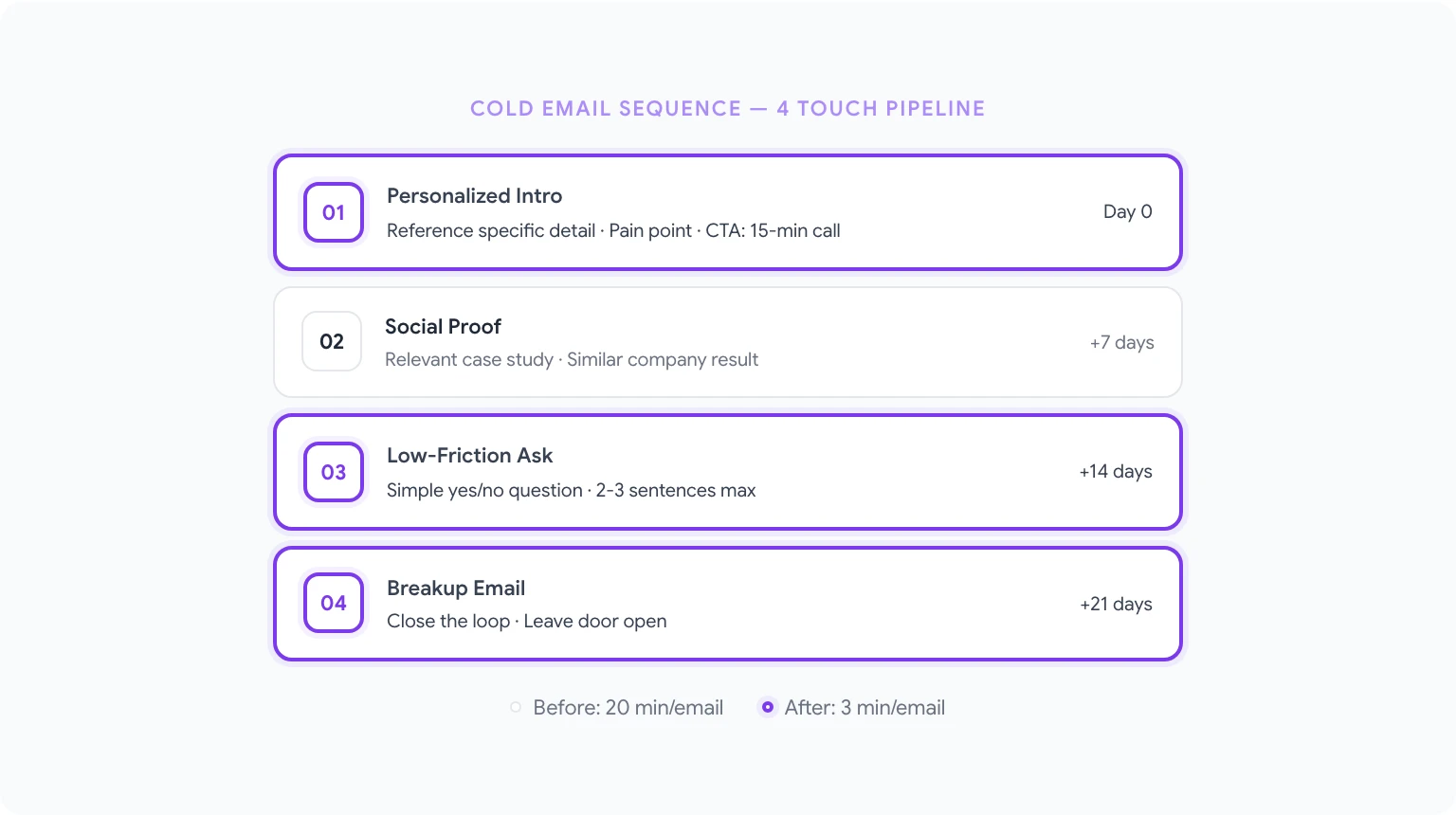
The AI drafts a personalized email in seconds. The rep reviews, adjusts if needed, and sends — or schedules it. What would have taken 20 minutes per prospect now takes 3.
For accounts you’re actively working, the same approach handles multi-touch sequences: “Write a 4-email follow-up sequence for a prospect who went dark after an initial call. Each email is 2–3 sentences, spaced one week apart, with a different angle each time: social proof, a relevant case study, a low-commitment ask, and a breakup email.”
For team-wide consistency, save your best-performing outreach frameworks as GPT Workspace prompt templates. Everyone on the team uses the same proven structure, personalized per prospect. You can find more prompt patterns in best ChatGPT prompts for Google Workspace.
Creating Proposals and Pitch Decks with AI
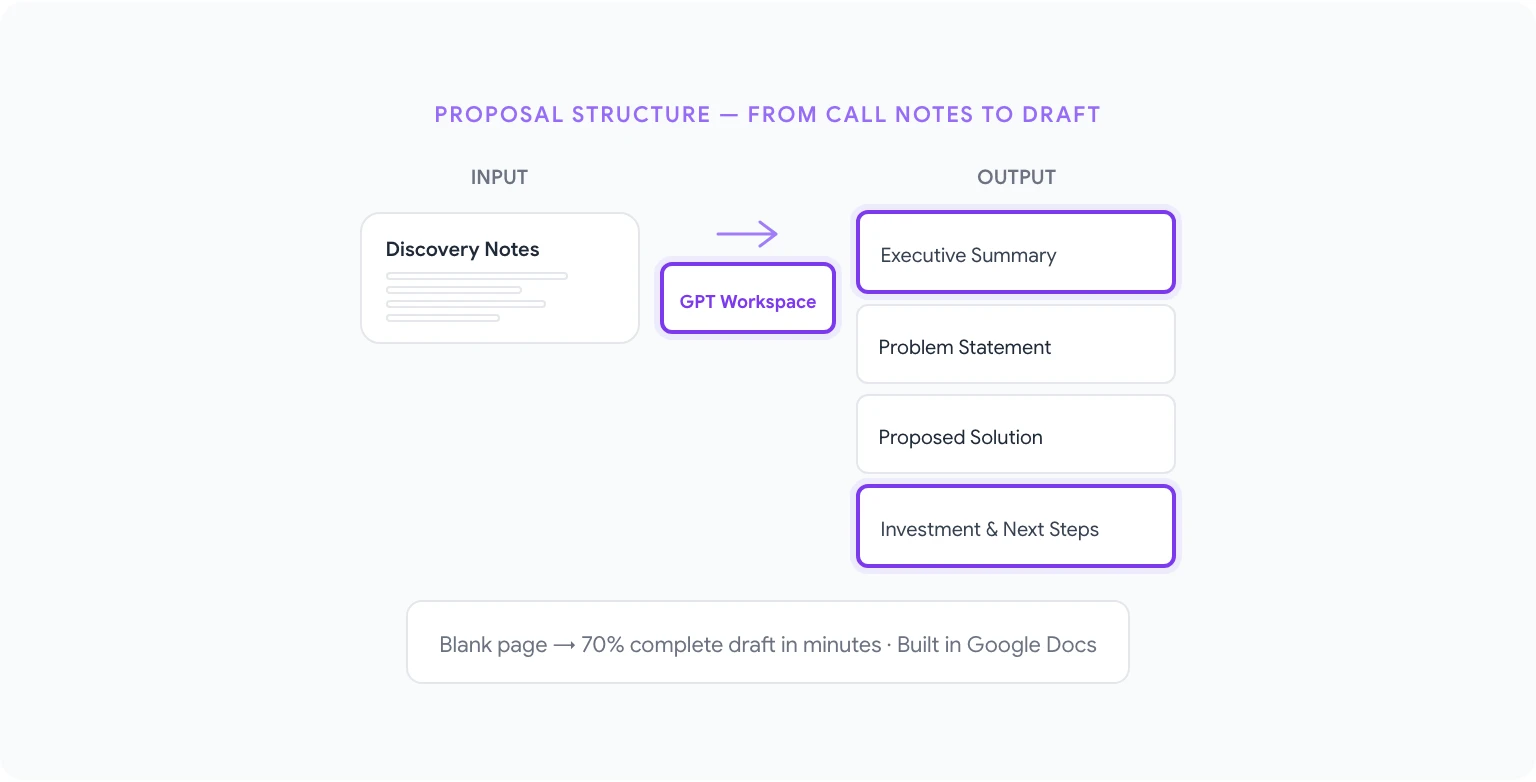
Proposals are where deals stall. The discovery call was great, the prospect is warm, and then a week passes while the rep builds the proposal from scratch. Speed matters at this stage — the longer the gap, the more the deal cools.
GPT Workspace can turn your call notes and deal context into a full proposal draft in Google Docs within minutes:
- After a discovery call, paste your notes into a Google Doc (rough is fine — bullet points, phrases, whatever you captured).
- Open the GPT Workspace sidebar and prompt: “Based on these call notes, write a proposal for [company name]. Structure: Executive Summary, Problem Statement (based on what they told us), Our Proposed Solution, Why [Our Company], Investment Summary (placeholder pricing), and Next Steps. Professional tone, under 800 words.”
- Review the draft, fill in placeholders, and refine.
The output won’t be perfect — you’ll adjust it — but the blank page problem is gone, and the structure is sound. You’re editing a draft that’s 70% there rather than building from nothing.
For pitch decks in Google Slides, the same approach works for generating slide-by-slide content outlines: “Create content for a 10-slide pitch deck for [prospect company]. Include: title slide, the problem we solve, our solution, how it works (3 bullet points per slide), a case study slide with [customer name] results, pricing model overview, ROI calculator framework, team credibility slide, and next steps.”
Analyzing Sales Data in Sheets
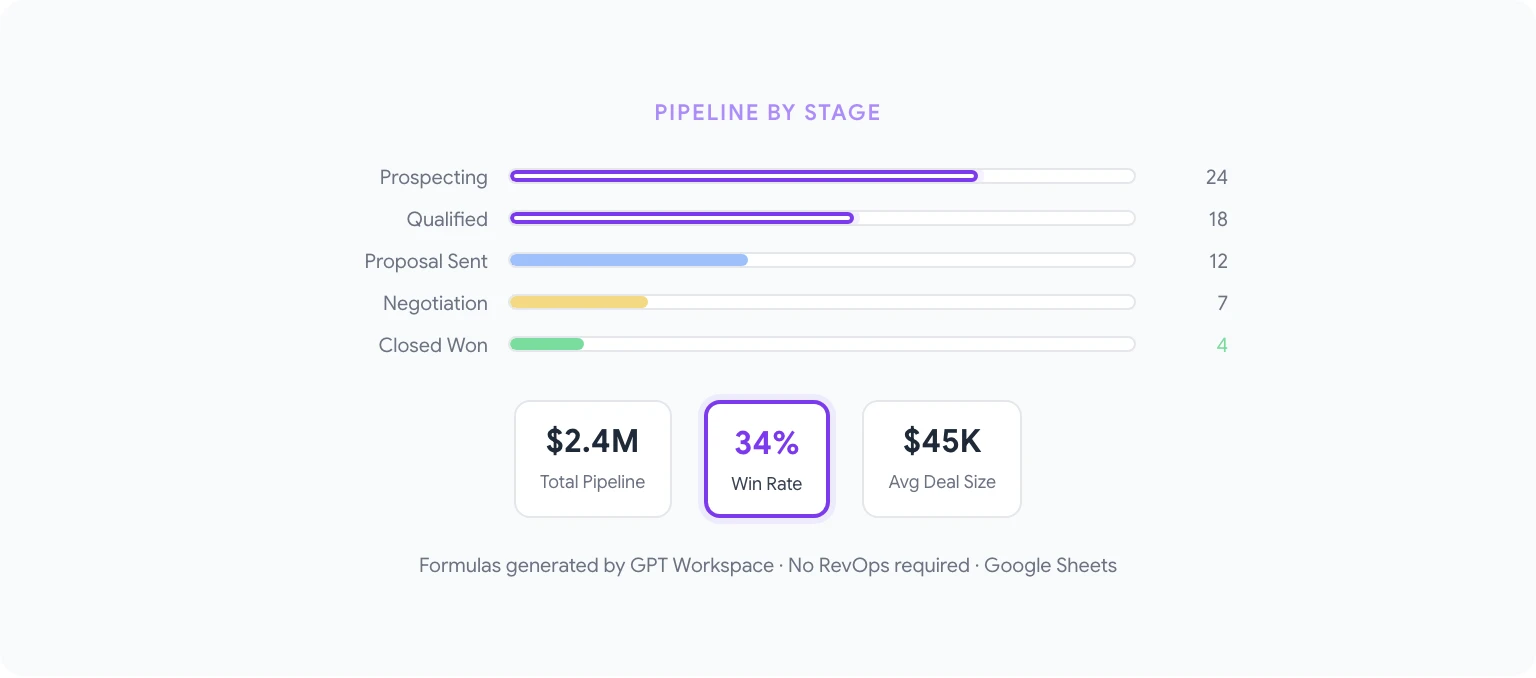
Pipeline hygiene, forecast accuracy, and quota tracking all live in spreadsheets. For most sales reps and managers, building the formulas that power these analyses is a bottleneck — either they have the skill and it takes time, or they don’t and they work with inadequate data visibility.
AI formula generation removes the skill barrier entirely. Using AI in Google Sheets, you can prompt:
- “Write a formula that calculates win rate: divide the count of rows where column C equals ‘Closed Won’ by the count of all rows where column C is either ‘Closed Won’ or ‘Closed Lost’.”
- “Create a SUMIF formula that totals the deal values in column D where the stage in column C equals ‘Negotiation’ and the rep name in column B equals ‘Sarah’.”
- “Write a formula that calculates average deal size for closed-won opportunities in the last 90 days. Closed date is in column E, deal value in column D, status in column C.”
- “Generate a formula that flags deals in column A that have been in ‘Proposal Sent’ stage (column C) for more than 14 days without an activity update (column F has the last activity date).”
For sales managers who run weekly pipeline reviews, AI can also write the narrative summary: “Write a 2-paragraph pipeline review summary for this week. Key figures: total pipeline value $2.4M, 14 deals in active stage, 3 deals moved to Closed Won ($180K ARR), 2 deals slipped to next quarter. Highlight the progress and flag the slippage.”
Automating Follow-Up Sequences
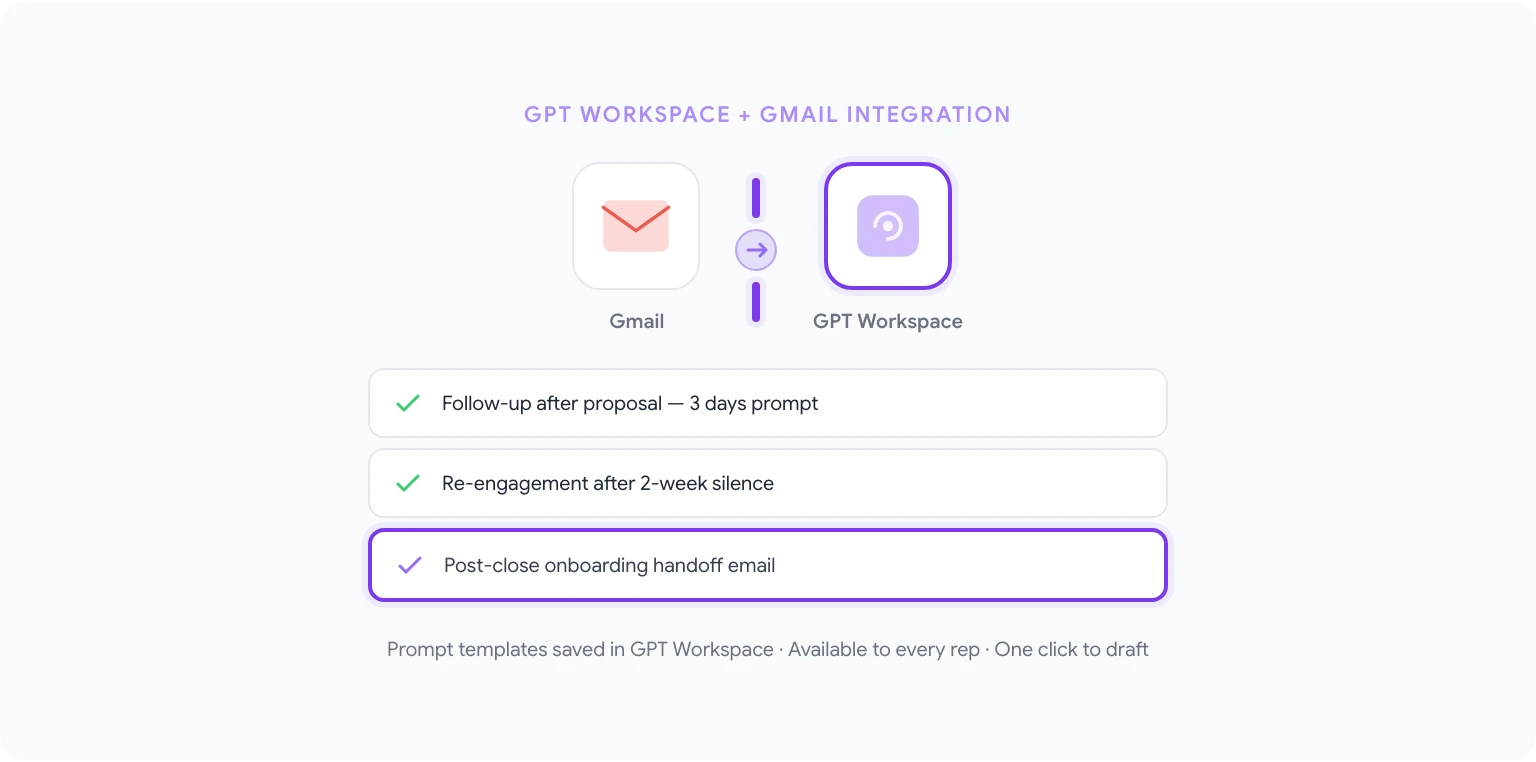
Most deals are lost to follow-up neglect, not competitive losses. A rep gets off a call, intends to follow up in three days, gets pulled into other priorities, and a week later the prospect has moved on. The best CRMs help with reminders, but they don’t write the emails.
GPT Workspace handles the drafting so the rep’s only job is to hit send:
- “Write a follow-up email for 3 days after sending a proposal. Reference the proposal briefly, offer to answer questions or walk through it live, and propose two specific times for a call.”
- “Draft a check-in email to a prospect who hasn’t responded in 2 weeks. We last spoke after a demo call. Keep it short — 3 sentences — and make the CTA a simple yes/no question.”
- “Write a post-close onboarding handoff email to introduce the new customer to our CS team. Mention the key outcomes they wanted to achieve (placeholder), who their CS contact is, and what happens in the first 30 days.”
For teams using Gmail, these prompt templates can be saved in GPT Workspace’s prompt library, so every rep has instant access to proven follow-up templates without needing to write from scratch. See AI email writing prompts for Gmail for a full set of sales-oriented email templates.
Summarizing Long Client Email Threads
Enterprise deals accumulate email threads that can run 50+ messages over several months. Before a stakeholder meeting, before a renewal conversation, or when a new rep inherits an account, someone needs to understand the full context — which usually means reading everything from the beginning.
GPT Workspace handles this in Gmail. Select the email thread (or copy the relevant messages into a Doc), then prompt:
- “Summarize this email thread. What was discussed, what was agreed, what’s outstanding, and what’s the current status of the deal?”
- “Extract all commitments made in this email thread: what we promised to the client, what the client committed to, and any deadlines mentioned.”
- “Write a one-paragraph account history summary based on this email thread, suitable for briefing a new account manager taking over this account.”
This is one of the highest-leverage uses of AI for sales — compressing days of context into a 3-minute read. You can automate repetitive tasks like this across Google Workspace by building prompt templates into your standard handoff processes.
Preparing for Sales Calls with AI Research
Thorough call prep sets reps apart in high-stakes conversations. Walking into an executive call knowing the company’s recent priorities, the buyer’s role and likely concerns, and the relevant case studies for their industry demonstrates seriousness — and it requires research.
AI accelerates the prep, not by replacing research judgment, but by helping synthesize and structure what the rep knows:
- “I’m meeting with the VP of Operations at [Company], a 500-person logistics company that recently expanded into [region]. Write a call prep brief: 3 likely pain points for their role, 2 questions to open with, and 2 objections I should anticipate and how to handle them.”
- “Write a one-page competitive positioning summary for a deal where we’re competing against [Competitor]. Cover: where we’re stronger, where they’re stronger, the questions to ask that shift the evaluation to our strengths.”
- “Create a meeting agenda for a 45-minute QBR with an existing customer. Include: review of past quarter results, discussion of upcoming priorities, expansion opportunity discussion, and action items.”
For teams with strong documentation in Sheets — ICP profiles, competitive battlecards, case study libraries — you can paste that context into the GPT Workspace prompt to make the output even more specific and accurate.
10 Sales-Specific Prompts
Copy and adapt these directly:
- “Write a cold email to a [title] at a [company type]. They’re likely struggling with [pain point]. Our product helps with [outcome]. Subject line + 90-word max body. CTA: 15-minute call.”
- “Create a follow-up sequence for after a demo: email 1 (same day thank you + next steps), email 2 (3 days later, answer likely questions), email 3 (1 week later, social proof), email 4 (2 weeks later, low-friction check-in).”
- “Write a proposal executive summary for [prospect] based on these discovery notes: [paste notes]. 150 words, problem → solution → outcome structure.”
- “Draft a LinkedIn message to a warm introduction prospect. We have a mutual connection who introduced us. Short, personable, value-first, under 75 words.”
- “Write a pricing objection response email. The prospect said our price is 30% above their budget. We’re not discounting but we can phase implementation. Professional, empathetic, focused on ROI.”
- “Generate a competitive displacement email for a prospect currently using [Competitor]. Reference a specific capability gap they likely experience. Under 100 words, no disparagement.”
- “Create a renewal risk summary for an account showing low engagement. Structure: risk indicators, likely reasons, recommended actions, draft reengagement email.”
- “Write a referral request email for a happy customer who just completed a successful implementation. Ask for 2 peer referrals. Warm, specific about what we’re looking for.”
- “Draft an internal deal review document for a large deal: opportunity summary, buyer map (names/roles/positions), deal status, key risks, proposed close strategy.”
- “Write a post-loss follow-up email to a prospect who chose a competitor. Keep the relationship warm for future consideration. Gracious, brief, no second-guessing their decision.”
Getting Your Sales Team Started
The most effective rollout starts with one workflow, not all of them. Most sales teams begin with outbound emails — it’s the highest-frequency task, the quality improvement is immediately visible, and the time savings are easy to measure.
Install GPT Workspace from gpt.space and start with a single rep or a small pilot group. Build 5–10 prompt templates based on your actual sequences, save them in the shared prompt library, and let the team adapt them. Within two weeks, you’ll have a clear signal on where AI is delivering the most value and where to expand next.
For team deployments, the Google Workspace Add-on version is easier to manage than the Chrome extension — your Workspace admin can deploy it to the whole sales organization without requiring each rep to install anything manually. That means adoption starts on day one rather than waiting for everyone to set up their own extensions.