GPT Workspace for HR Managers: Automate Job Descriptions, Reviews & Onboarding
How HR managers use GPT Workspace to write job descriptions, screen resumes in Sheets, generate performance reviews, and automate onboarding docs — all inside Google Workspace.

HR professionals spend an enormous portion of their week on tasks that are fundamentally writing and data work: drafting job postings, preparing review templates, onboarding new hires, communicating policy updates. None of it requires deep expertise to produce — but all of it takes time, and the volume rarely decreases. AI for HR managers in Google Workspace changes that equation significantly. The same tools HR teams already use every day — Docs, Sheets, Gmail — can now produce a polished job description in two minutes instead of forty, flag resume gaps automatically, or generate a complete onboarding packet before you’ve finished your first coffee.
This guide covers exactly how to use GPT Workspace for the HR workflows that consume the most time: writing job descriptions, screening applicants, generating performance review templates, onboarding new hires, and communicating with candidates.
Why HR Managers Are Switching to AI Workflows
The switch isn’t happening because HR managers are looking for technology to play with. It’s happening because the workload is growing faster than headcount, and manual processes don’t scale. A mid-sized company opening five roles simultaneously means five complete job descriptions, five sets of screening criteria, five interview guides, and five offer letters — all needing to be tailored to the specific role, team, and compensation band.
AI doesn’t replace the judgment behind those decisions. What it replaces is the keystroke work: turning a bulleted list of requirements into a full job description, converting performance notes into formal written reviews, transforming an onboarding checklist into a formatted document package. The HR manager still owns the decisions — the AI handles the drafting.
The other reason adoption is accelerating is the tooling itself. GPT Workspace lives inside Google Docs, Sheets, and Gmail — which is where most HR work already happens. There’s no new platform to learn, no integration to configure, no data to export. You open a Google Doc the same way you always have, and the AI panel is there on the right side, ready to work.
Writing Job Descriptions in Seconds
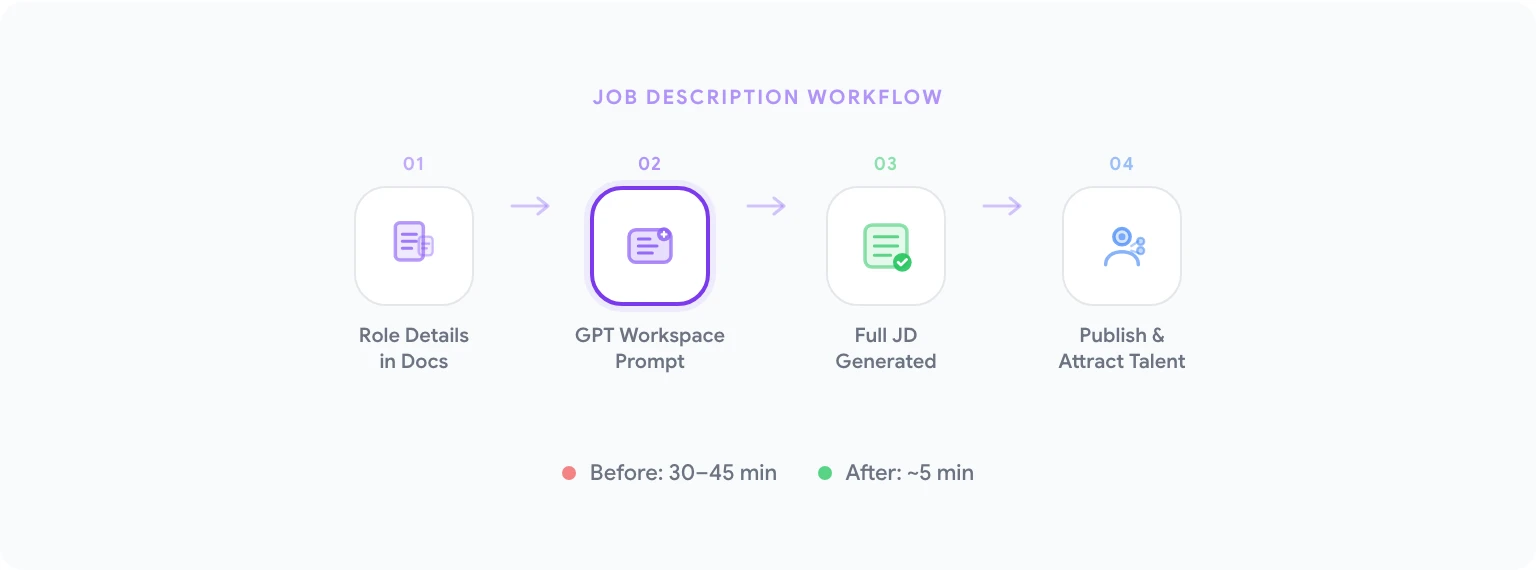
A well-written job description is the first filter in your hiring pipeline. A poorly written one produces the wrong applicants, wastes screening time, and signals something about your company culture before anyone even applies. Getting them right matters, but they’re time-consuming to write from scratch — especially for roles you’ve never hired for before.
GPT Workspace makes this fast and consistent. The workflow:
- Open a new Google Doc and list the role details in plain text: title, team, reporting line, key responsibilities, must-have qualifications, nice-to-have skills, location and remote policy, compensation range if disclosed.
- Open the GPT Workspace sidebar via Extensions > GPT for Sheets, Docs, Slides.
- Prompt: “Write a full job description based on these details. Include an ‘About Us’ placeholder, a responsibilities section, a qualifications section (split required and preferred), and a benefits section. Use an inclusive, direct tone and avoid jargon.”
- Review the output, make adjustments, and insert it into the document.
What previously took 30–45 minutes now takes 5. More importantly, your job descriptions become structurally consistent across roles, which makes them easier to maintain and update as requirements evolve.
For roles you hire repeatedly (customer support, SDRs, engineers), save your best job description format as a GPT Workspace prompt template. The next time you need one, you’re adapting a proven structure rather than starting from scratch.
You can use ChatGPT in Google Docs to iterate on tone and length quickly — selecting individual sections and asking for rewrites until the voice matches your employer brand.
Screening Resumes with AI in Sheets
Resume screening is one of the highest-volume, lowest-enjoyment tasks in recruiting. Doing it well requires consistent criteria; doing it at scale requires either a lot of time or the ability to automate some of the analysis. Sheets can handle both.
The practical approach: create a screening tracker in Google Sheets with a column for each resume or applicant. Use AI in Google Sheets to generate formulas and automate scoring logic.
Useful prompts for building your screening workflow:
- “Write a formula that assigns ‘Yes’, ‘Maybe’, or ‘No’ based on whether the text in column C mentions all three of the following keywords: ‘Python’, ‘SQL’, ‘machine learning’.”
- “Create a formula that extracts years of experience from a plain-text resume summary in column D. Return a number or ‘Not specified’.”
- “Generate a COUNTIF formula that counts how many applicants in column E have a ‘Yes’ screening status.”
- “Write a formula that flags rows where the application date in column B is more than 14 days old and the status in column F is still ‘Pending’.”
For small batches (under 50 applicants), you can paste resume text directly into GPT Workspace and ask for a structured summary: “Summarize this resume in a structured format: years of experience, most recent role, relevant skills for a [role title] position, and any notable gaps or concerns.” Insert the summary into the corresponding row in your tracker.
This isn’t about replacing human judgment on hiring decisions. It’s about making sure you’re spending your human judgment time on candidates who actually meet the baseline criteria, not triaging a spreadsheet manually.
Generating Performance Review Templates
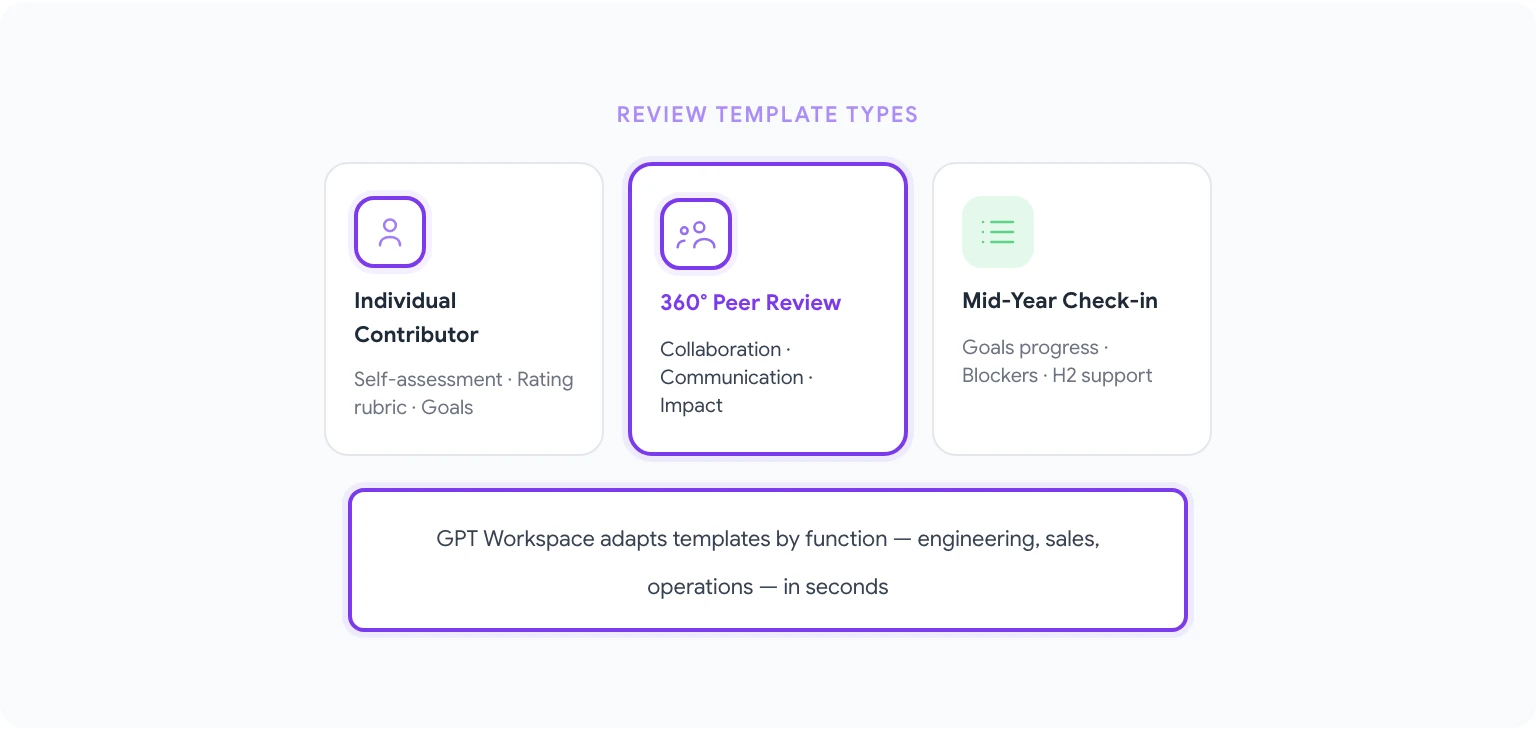
Performance review cycles are predictable, high-stakes, and time-intensive. The typical HR manager spends days per cycle: sending templates, chasing submissions, editing manager drafts, compiling feedback. AI handles most of the drafting work.
Use GPT Workspace in Docs to build review templates tailored to each role level or function:
- “Write a performance review template for an individual contributor. Include sections for: self-assessment (3–5 reflective questions), manager rating rubric (1–5 scale with descriptions for each score), key achievements, areas for development, and a goal-setting section for the next period.”
- “Create a 360-degree feedback template for peer reviews. Keep questions concise and focused on observable behaviors. Include 8 questions covering collaboration, communication, reliability, and impact.”
- “Generate a mid-year check-in template. Shorter than an annual review — focus on progress against goals, blockers, and any support the employee needs in H2.”
Once you have base templates, use AI to adapt them by function: the criteria relevant to a software engineer’s review differ meaningfully from a sales rep’s. Prompt: “Adapt this performance review template for a sales role. Replace technical skills references with sales-specific competencies: pipeline management, quota attainment, prospecting activity, and client relationship quality.”
For managers who struggle to write constructive feedback (and most do, early in their management career), GPT Workspace can help translate vague impressions into specific, professional language. A manager writes: “John is good but sometimes misses the bigger picture.” GPT turns it into: “Demonstrates strong execution on defined tasks; continues to develop the strategic perspective needed to prioritize independently and anticipate downstream implications of decisions.”
You can learn more about prompt-building for repeatable HR tasks in automating Google Workspace tasks with AI.
Creating Onboarding Documents Automatically
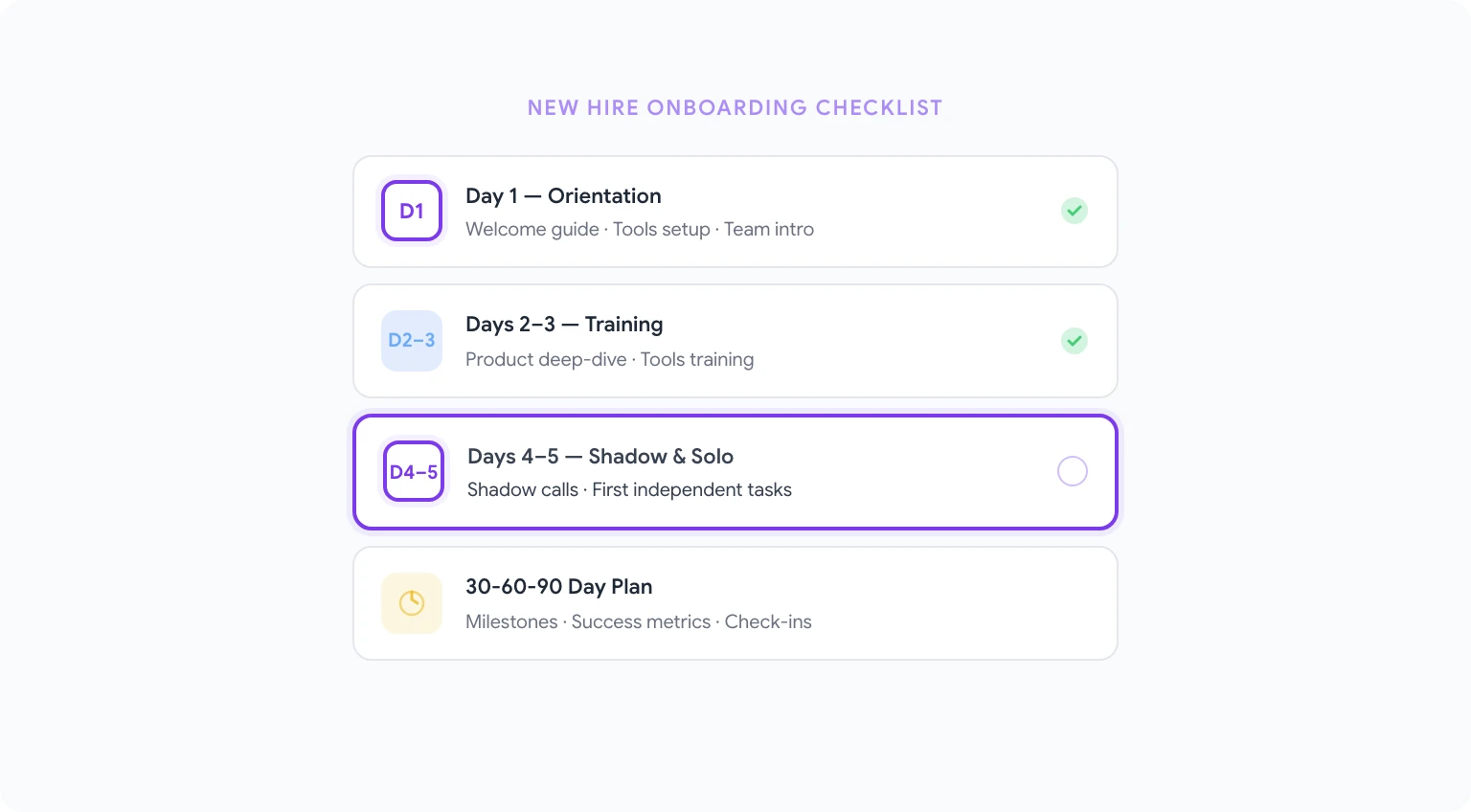
First-week onboarding is where new hires form their lasting impression of organizational competence. A disorganized onboarding experience doesn’t just frustrate the new hire — it signals something about how the company operates. Good onboarding documentation is the foundation, and it’s almost entirely a writing task.
GPT Workspace can generate complete onboarding document sets from brief inputs:
- “Create a first-week onboarding plan for a new customer success manager. Include Day 1 orientation activities, Days 2–3 product and tools training, Day 4 shadow calls, and Day 5 first independent tasks. Include a section on ‘Who to meet’ with placeholder names.”
- “Write an onboarding welcome guide for remote employees. Cover: equipment setup, communication tools and norms, how we run meetings, where to find information, and who to contact for what. Tone should be warm but professional.”
- “Generate a 30-60-90 day plan template for a new account executive. Each phase should have 3–4 specific goals, a success metric, and a check-in milestone with their manager.”
The real leverage comes from building role-specific onboarding packages. Rather than maintaining one generic document that everyone ignores, you have a Docs template per function that HR or the hiring manager fills in with AI assistance before the hire’s start date.
For HR teams using Google Forms for onboarding paperwork, AI can also help generate the form questions: “Write 12 onboarding intake questions for a new employee form. Cover: role and personal details, emergency contact, equipment preferences, preferred working hours, communication style preferences, and any immediate accommodations needed.”
Drafting Offer Letters and Rejection Emails
Offer letters and rejection communications have to be accurate, appropriately warm or formal, and legally defensible. They’re also high-volume in active hiring cycles. AI handles the drafting; your legal review handles the compliance.
For offer letters: “Draft a job offer letter for [role title] with a start date of [date], base salary of $[X], and [benefits list]. Include at-will employment language, mention that the offer is contingent on background check, and request signature by [date]. Keep the tone professional but welcoming.”
For rejection emails: “Write a rejection email for a candidate who interviewed for [role] but wasn’t selected. We want to keep the door open for future opportunities. Be warm, specific enough to feel personalized, but don’t give detailed feedback. Under 100 words.”
For internal role announcements: “Write an internal announcement for [employee name]‘s promotion to [new title]. Highlight their tenure, key contributions, and new responsibilities. Keep it under 150 words and celebratory in tone.”
These aren’t complex to write, but doing them well at volume — when you’re managing multiple open roles simultaneously — takes longer than it should. AI cuts each draft from 15 minutes to 2.
For candidate communication at scale, the same patterns work in Gmail. See AI email writing prompts for sequences you can adapt for recruiting workflows.
Building HR Dashboards with AI Formulas
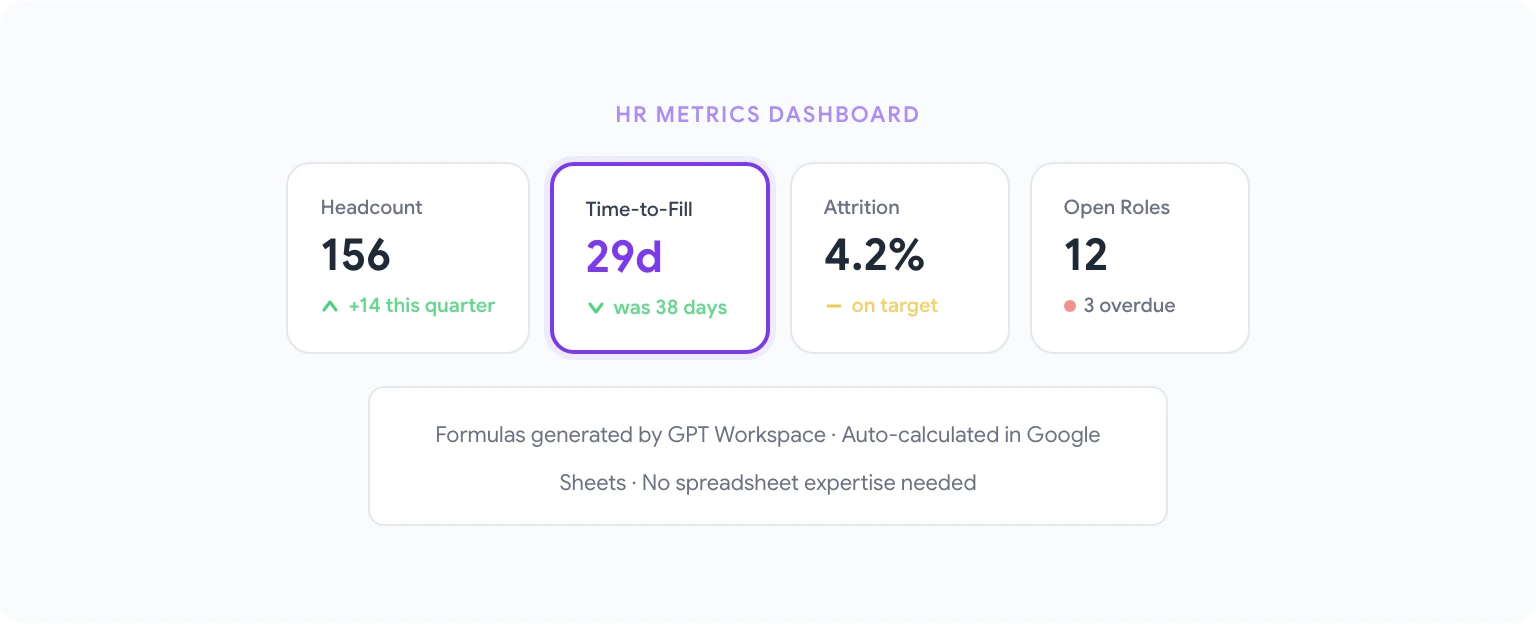
HR reporting — headcount trends, time-to-fill, attrition rates, compensation benchmarking — lives almost entirely in Sheets. The challenge is that building meaningful formulas requires spreadsheet knowledge that not every HR manager has.
GPT Workspace eliminates that bottleneck:
- “Write a formula to calculate average days-to-fill for roles in column C, using the job-open date in column A and the offer-accepted date in column B. Exclude rows where column B is empty.”
- “Create a formula that calculates monthly attrition rate: number of departures in column D divided by average headcount (columns E and F are headcount at month start and end). Format as a percentage.”
- “Write a COUNTIFS formula that counts how many employees in the range A2:A200 belong to the ‘Engineering’ department (column B) and were hired in the last 12 months (column C contains hire dates).”
- “Generate a formula that flags employees in column A whose performance review is overdue — defined as review date in column D being more than 30 days in the past and status in column E not equal to ‘Complete’.”
For HR teams that present quarterly reports to leadership, AI can also write the narrative commentary: “Write a 3-paragraph HR metrics summary for Q1. Key figures: headcount grew from 142 to 156, time-to-fill decreased from 38 days to 29 days, voluntary attrition was 4.2%. Highlight the improvement in time-to-fill and note the headcount growth is ahead of annual plan.”
10 HR-Specific Prompts for GPT Workspace
Copy and adapt these for your workflows:
- “Write a job description for a [role title] at a [company size] [industry] company. Include responsibilities, required qualifications, preferred qualifications, and a ‘Why join us’ section. Inclusive language, no jargon.”
- “Create a structured interview guide for a [role title] with 6 behavioral questions and 3 technical questions. For each behavioral question, include the STAR framework prompt.”
- “Write a performance improvement plan (PIP) template. Include: context section, specific improvement areas, measurable goals with timelines, support provided by the company, and consequences if goals are not met.”
- “Draft a return-to-office policy update email. Cover the new expectation (3 days/week in office), effective date, and FAQs addressing the most common concerns. Professional but empathetic tone.”
- “Generate an employee satisfaction survey with 10 questions. Mix Likert scale and open-text questions. Cover: role clarity, manager relationship, career development, team dynamics, and company culture.”
- “Write a reference check script with 8 questions for checking on a candidate for a [role title] position. Include questions about work style, reliability, strengths, areas for growth, and eligibility for rehire.”
- “Create a compensation benchmarking summary template. Include fields for: role, level, internal current salary, market P25/P50/P75, compa-ratio, and recommendation action.”
- “Write a ‘Manager Expectations’ document for new managers at a company where individual contributors are promoted into their first management role. Cover: the shift in priorities, how to run 1:1s, giving feedback, and navigating former-peer dynamics.”
- “Draft a parental leave policy document covering: eligibility, duration for primary and secondary caregivers, pay during leave, return-to-work support, and process for requesting leave.”
- “Generate an exit interview script with 10 questions designed to surface actionable retention insights. Cover: reasons for leaving, manager relationship, role satisfaction, culture, and what would have changed their decision.”
For even more prompts organized by Google app and use case, see best ChatGPT prompts for Google Workspace.
Getting Started for Your HR Team
The fastest way to evaluate GPT Workspace for HR is to pick one workflow you do repeatedly and run it through AI for a week. Job descriptions are often the best starting point — high frequency, clear quality standard, easy to compare before and after.
Install GPT Workspace from the GPT Workspace documentation and setup guide, sign in with your Google account, and open the first Google Doc you’d normally draft manually. The sidebar will be waiting.
For teams, the add-on deployment (rather than the Chrome extension) is easier to manage at scale — your Google Workspace admin can push it to everyone in the organization from the Admin Console, so HR doesn’t need each manager to install anything individually.
The goal isn’t to automate HR judgment. It’s to reclaim the hours spent on the drafting work so that judgment — on who to hire, how to develop people, how to build the team — gets more of your attention instead of less.